S o f t w a r e     f o r     a u t o m a t i c     c r e a t i o n     o f     m o d e l s     u s i n g     p a r a m e t r i c     d a t a

  Generic Model Creation 

INPUT Tunnel Examples 
ICDAS YouTube Channel   ICDAS GEN 2027.00R 


123456789_123456789_1123456789123456789_123456789_123456789_123456789_123456789_123456789_1123456789_ 123456789_123456789_123456789_123456789_123456

Examples


Model description


Input


BIM model


Analysis model


Subscription 


PAGE 1  2  3


The steps of tunnel input (continued from Input Page 1)


You can create a tunnel by additive input running. It can e.g. be two running of two stretching AB and CD where profiles A, B, C and D are different. They are control by nSTL, (X, Y, Z) alignment and the selected Profile1, Profile2 outlined in the previous section.


Below shows the 4-steps to create the tunnel in Floor Plan view. The nSTL is set to 3, 1, 1 and 2 stretching where the user activate/modify (X, Y, Z) alignment and select Profile1, 2 accordingly. It is to implement the varying width of the gravel seabed along the tunnel.


1. Prof1 Standard, Prof2 Standard

a/ Set nSTL=3 to create the three center sections Standard1, Standard2 and Standard3.

b/ At XYZ Alignment activate the 6 rows of Standard1, Standard2 and Standard3.

c/ At profiles input activate Profile1 Standard, Profile2 Standard for Gravel seabed and Seabed.

   Input for the concrete tunnel and the voids inside are not shown. 
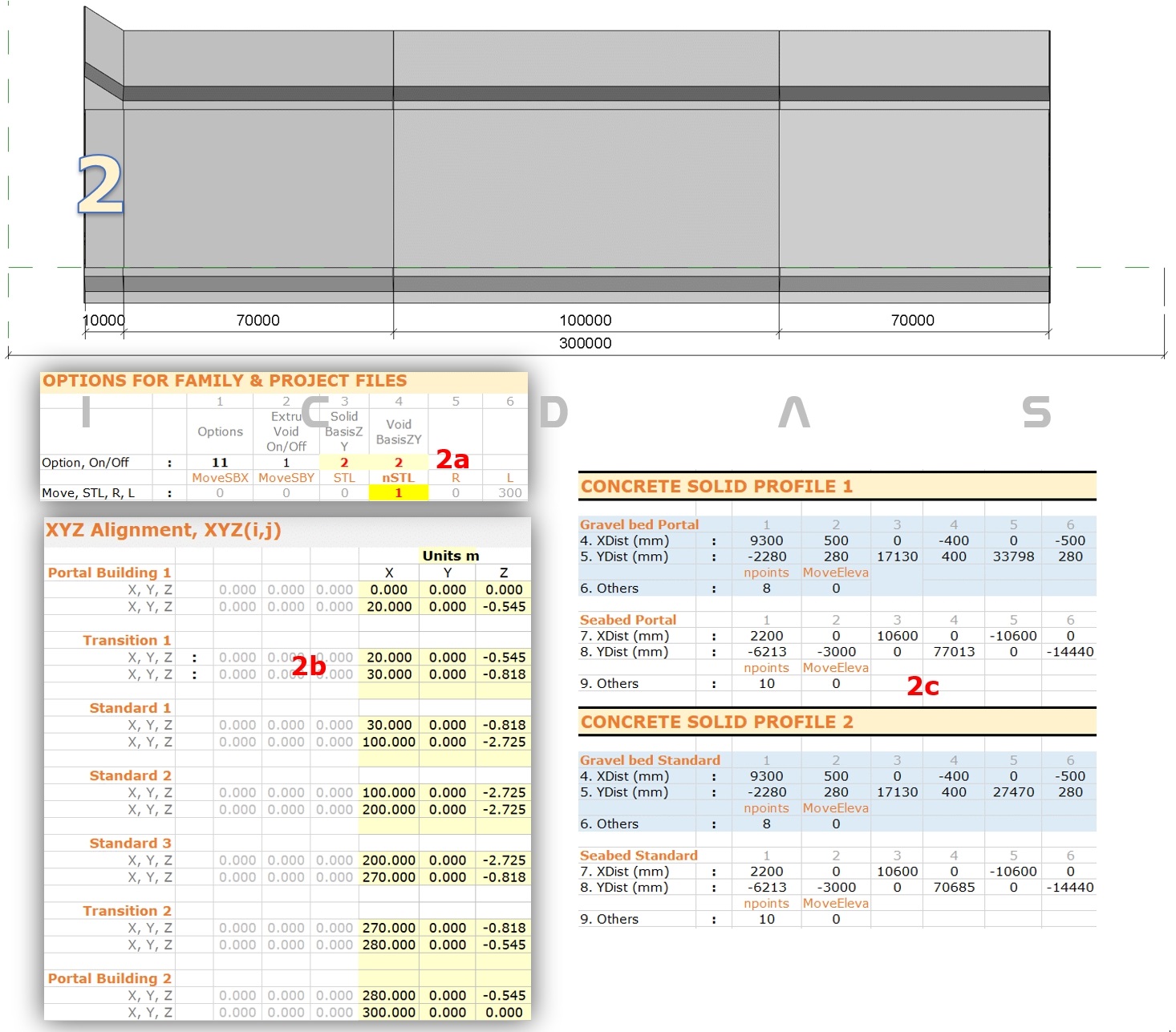
 

Figure: Profiles & STL for nSTL=3 stretching.

123456789_123456789_1123456789123456789_123456789_123456789_123456789_123456789_123456789_123456789_ 123456789_123456789_123456789_123456789_1234567


2. Prof1 Portal, Prof2 Standard

a/ Set nSTL=1 to create the Transition1.

b/ At XYZ Alignment activate the 2 rows with distances X for the Transition1.

c/ At profiles input activate Profile1 Portal, Profile2 Standard for Gravel seabed and Seabed.

    Input for the concrete tunnel and the voids inside are not shown. 


Figure: Profiles & STL for nSTL=1 stretching (continued)


3. Prof1 Standard, Prof2 Portal

a/ Set nSTL=1 to create the Transition2.

b/ At XYZ Alignment activate the 2 rows with distances X for the Transition2. 

c/ At profiles input activate Profile1 Standard, Profile2 Portal for Gravel seabed and Seabed.

    Input for the concrete tunnel and the voids inside are not shown. 


Figure: Profiles & STL for nSTL=1 stretching (continued)


4. Prof1 Portal 2, Prof2 Portal

a/ Set nSTL=2 to create the 2 portal sections.

b/ At XYZ Alignment activate the 4 rows with distances X for the two portal sections. 

c/ At profiles input activate Profile1 Portal, Profile2 Portal for Gravel seabed and Seabed.

    Input for the concrete tunnel and the voids inside are not shown. 
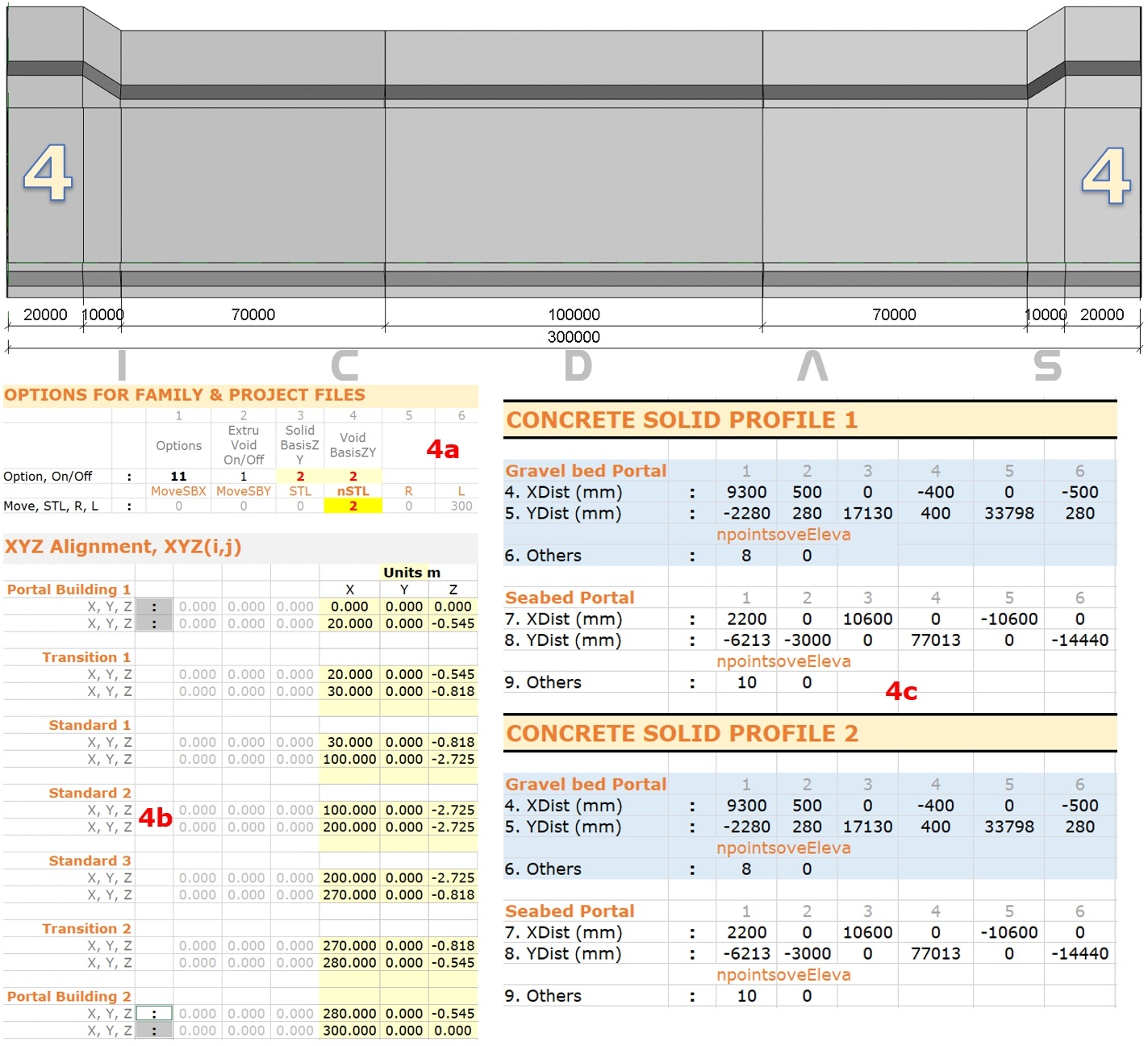

Figure: Profiles & STL for nSTL=2 stretching (continued)


PAGE 1  2  3


123456789_123456789_1123456789123456789_123456789_123456789_123456789_123456789_123456789_123456789_ 123456789_123456789_123456789_123456789_1234567


123456789_123456789_1123456789123456789_123456789_123456789_123456789_123456789_123456789_123456789_ 123456789_123456789_123456789_123456789_1234567


123456789_123456789_1123456789ICDAS  •  Hans Erik Nielsens Vej 3  •  DK-3650 Ølstykke  •   E-mail: th@icdas.dk   •  Tel.: +45 60 53 83 79  •  CVR no.: 34436169